
.svg)
Ticket management across every channel
Ticket management
Phone, email and chat automatically become tickets in Lynes contact center. Workspace has composable filters for custom views, and AI handles transcription and labels in the background.
Phone, email and chat automatically become tickets in Lynes contact center. AI transcribes, labels are generated automatically, and Workspace lets teams build their own filters and views to find the right ticket fast.
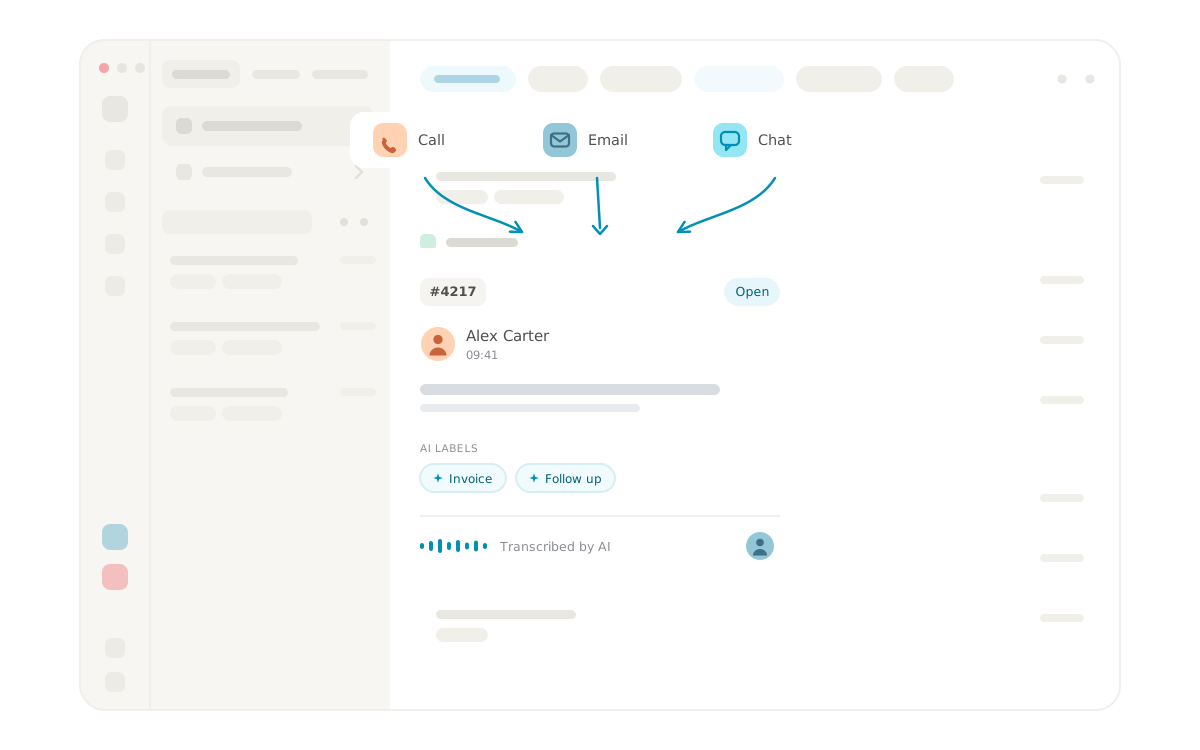


Ticket management that brings every channel together
Ticket management in Lynes contact center means that every customer contact automatically becomes a ticket with a unique ticket number. Phone calls, emails and chat messages are handled in the same interface, with the same history and the same follow-up tools.
That means agents do not have to switch between separate systems for different channels. Everything lives in one place, and that is where collaboration, follow-up and replies happen.
What is ticket management in Lynes contact center?
Ticket management is the system where Lynes keeps track of what was said, by whom, when and how a customer contact was resolved. When a call comes in, a ticket is created. When an email arrives, a ticket is created. When a chat starts, a ticket is created. Everything is tagged, transcribed and becomes searchable.
In practice, ticket management is what lets your team provide consistent service, whether the customer calls on Monday morning or chats on Friday afternoon. The full history is there, so no customer has to repeat themselves.
Workspace with a composable filter system
Workspace is the view where agents and teams handle their tickets in Lynes. It has a composable filter system with fixed view presets. You can also compose filters by combining status, latest activity, channel and assigned agent.
The result can be saved as a custom view and optionally shared with the organization. An agent who wants to see their open chats from the last 24 hours can build that view in seconds and share it with the colleague covering the weekend. A team lead can build a view for unanswered tickets on a specific channel and share it with the entire team.
Workspace has also been given an updated visual style and a toggle for switching between card and list view. The new filter view is currently an experimental preview feature that activates separately.
How do calls, emails and chats become tickets?
Phone calls
When a call comes in, a ticket is created automatically and assigned a ticket number. The agent can handle the ticket directly or forward it to the right person or team without leaving the interface.
Incoming emails are registered as tickets. Communication and follow-up happen in the same flow as the other channels, and the response goes back to the customer through the same email conversation.
Chat
Customer chats are converted into tickets and follow the same structure as phone calls and email. Agents work the same way regardless of which channel the customer chose.
AI that lifts ticket management
With Lynes conversation intelligence, AI capabilities are layered on top of ticket management. Calls are transcribed automatically, tickets get AI-generated labels that make them easier to filter, and AI support agents can handle simpler calls and chat messages entirely without human involvement.
It is not AI for the sake of AI. It is the specific moments where the machine is faster and more consistent than a human, so the agent can focus on the tickets that actually require judgment.
Work from anywhere
Lynes contact center works on Mac, Windows, Linux, browser, iPhone, iPad and Android. Agents can reply to a ticket from the office, from home or on the move, and the history follows along regardless of device.
What is included in Lynes ticket management?
- Multi-channel ticket management that brings phone, email and chat into the same interface
- Full history and traceability per ticket, from first contact to resolution
- Workspace with composable filters that save and share across the organization
- AI for faster handling with automatic transcription, labels and prioritization
- Platform independent, works on all major operating systems and devices
Frequently asked questions and answers
Here we have collected the most frequently asked questions about Lynes' features, pricing and support. Can't find the answer to your question? Do not hesitate to contact our customer service and we will be happy to help you further!
Of course! You can use several operators together with Lynes - choose the one that suits you!
We did! And we are super proud of it. We control the product from start to end.
We store it in Sweden, with all the necessary encryptions.
It works just as well on Windows, macOS, Linux, iOS & Android!
Our app works with several operators in Sweden. Choose and combine amongst our own subscriptions, Telia, Tele2, Tre and Telenor.
Yes. Lynes contact center manages phone, email and chat in the same system, with full history, internal communication and AI support. You get the entire case flow in one place, without switching between platforms.
Yes, it works on both iOS, iPadOS and Android with full functionality.
Absolutely, you can easily forward tickets internally and track their status.
Yes, AI agents can assist in both telephony and chat, as well as solve simple tickets all by them self.
Related Features
Lynes is packed with innovative features that will turn your client's workday into a breeze. With Lynes, you'll get the latest business phone technology from Sweden. Simply put - a carefree software that's both Lynes to use and simple to administrate.

Conversation Intelligence
Med Conversation Intelligence behöver du aldrig mer glömma viktiga detaljer från ett samtal. Vi spelar in, transkriberar och summerar alla era samtal så att du enkelt kan söka fram informationen!
Conversation Intelligence
Med Conversation Intelligence behöver du aldrig mer glömma viktiga detaljer från ett samtal. Vi spelar in, transkriberar och summerar alla era samtal så att du enkelt kan söka fram informationen!

Wallboard
Visualize your data and make it available on one or more wallboards. We let you customize each wallboard and populate it with the response groups and data you desire!
Wallboard
Visualize your data and make it available on one or more wallboards. We let you customize each wallboard and populate it with the response groups and data you desire!
Ticket management
Phone, email and chat automatically become tickets in Lynes contact center. Workspace has composable filters for custom views, and AI handles transcription and labels in the background.
Ticket management
Phone, email and chat automatically become tickets in Lynes contact center. Workspace has composable filters for custom views, and AI handles transcription and labels in the background.

Analytics
Lynes Analytics is a powerful built-in tool that lets you track performance in real time — from queued calls to average response times — giving you instant insights into your response groups.
Analytics
Lynes Analytics is a powerful built-in tool that lets you track performance in real time — from queued calls to average response times — giving you instant insights into your response groups.

AI telephonist
With Lynes AI telephonist, you'll never miss a call again. It responds, informs, relays or takes messages. Fully automatic, even when no one is in place!
AI telephonist
With Lynes AI telephonist, you'll never miss a call again. It responds, informs, relays or takes messages. Fully automatic, even when no one is in place!

Auto Labels
Auto labels automatically mark important calls, send alerts and give you instant visibility. Also works for personal numbers and manual tagging.
Auto Labels
Auto labels automatically mark important calls, send alerts and give you instant visibility. Also works for personal numbers and manual tagging.

.svg)
Dashboard
Our dashboard makes it effortless to monitor response groups in real time. See performance, queue size, and follow-ups at a glance — all the insights you need are right there, easy and instant.
Dashboard

Conversation Intelligence
Med Conversation Intelligence behöver du aldrig mer glömma viktiga detaljer från ett samtal. Vi spelar in, transkriberar och summerar alla era samtal så att du enkelt kan söka fram informationen!
Conversation Intelligence

.svg)
Svarsgrupper
An answer group from Lynes is more than just opening hours, it is an advanced, yet easy-to-manage part of your business switchboard that reduces the risk of you missing calls.
Svarsgrupper
Contact Us
Collaboration tool or a phone system? Lynes is both.
Lynes is not just a great collaboration tool for your business. Or a awesome phone system. Lynes are both. It allows you to hold video meetings, receive calls, chat with colleagues and customers and share documents - all in the same workflow.
A selection of our customers


Interested? Talk with us today.
The form only appears on the live page
The form only appears on the live page
The form only appears on the live page