
.svg)
Search fields to organize and find colleagues
Search fields
Search fields let admins organize people into categories like location or role. Managed from a single table with drag-and-drop, and optionally extendable by users themselves.
Categorize people in your organization with search fields. Admins manage from a single table, users find colleagues by their assigned search fields, and an optional setting lets users add their own from their profile.
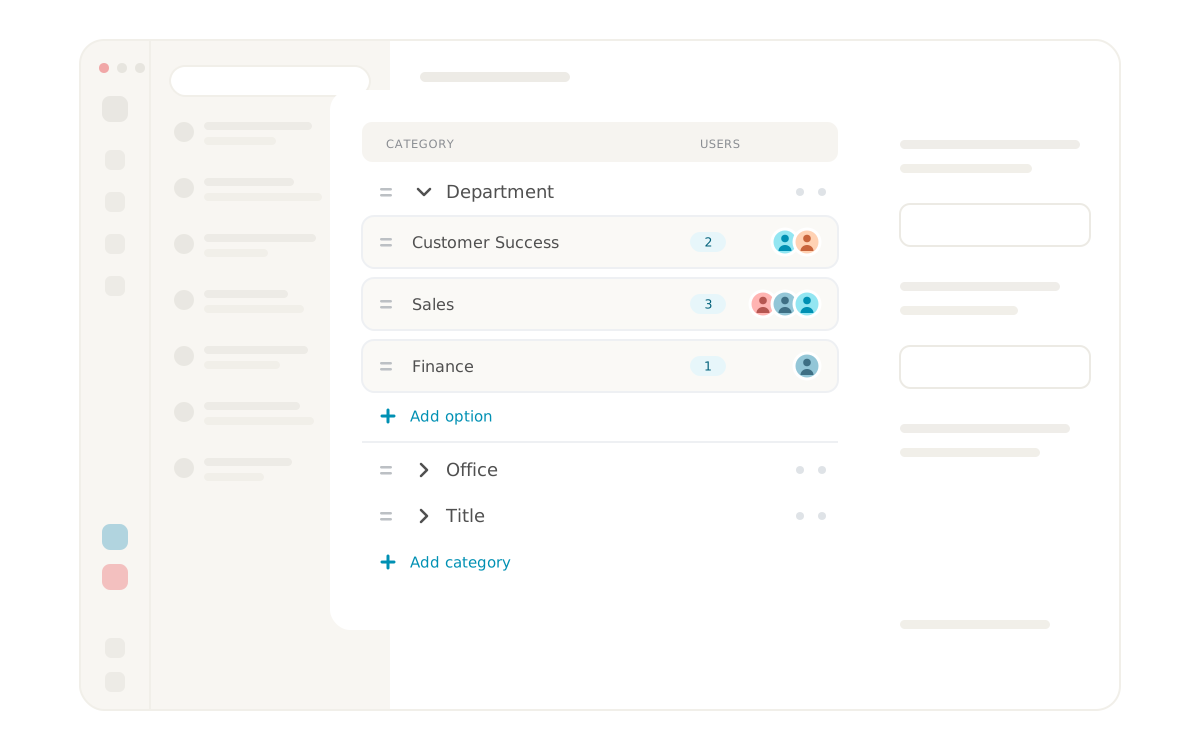


Search fields bring structure to the organization
Search fields are a lightweight categorization feature in Lynes that lets administrators describe people with fields like location, role, language or whatever else your organization needs. Each category contains options, and each option can be assigned to the users it fits.
The result is an organization where it becomes easier to see who's who, without administrators having to build out new fields in the HR system or pull in additional tools to get an overview.
How do search fields work in Lynes?
Search fields are managed from a single table in the Lynes admin panel. Categories and options are created, renamed and organized directly in the table. Assigning users to options happens per option, so the same user can carry multiple search fields from different categories.
The table supports drag-and-drop for reordering categories and options. Renaming happens directly in the table without a separate edit mode. That means an administrator can restructure the entire search field taxonomy in minutes rather than days.
Who manages search fields, and who can add new ones?
By default, administrators manage all categories and options. For organizations that want to decentralize that responsibility, a setting lets regular users add their own options, or entire categories, directly from their profile.
This makes it easy for a user to add a new location when someone moves, or a new job title that does not yet exist in the list. Administrators retain control over whether and when that setting is on, so the search field library can stay tight or be opened up depending on what the organization needs.
What do search fields solve in practice?
In a growing organization it quickly gets hard to keep track of who does what, who sits where and who has which skills. That information is often scattered across HR systems, intranets, and in the heads of the people who have been around the longest.
Search fields centralize that information in the same tool where communication already happens. If you need to reach a colleague in Malmö who handles invoicing questions, you search for Malmö and finance and find the right person directly, without going through a separate service or asking around.
Quick search by location or role
Once search fields are in place, users can search for colleagues based on the search fields assigned to them. The search works the same way as regular user search in Lynes, with the addition that search fields also match.
The practical result is that a user searching for Gothenburg gets every colleague in Gothenburg, or searches for support and gets everyone in the support team. User search becomes more than name lookup, it becomes a way to navigate the organization.
Requirements
- Search fields are included with Lynes and require no separate licence
- Administrators manage search fields from the Lynes admin panel
- The setting that lets users add their own search fields is a separate toggle controlled by administrators
- Search fields become visible and searchable as soon as they are assigned to a user
Frequently asked questions about search fields
What are search fields in Lynes?
Search fields are a categorization feature in Lynes that lets administrators organize people in the organization through categories and options, for example location Stockholm or role support. Users find colleagues by searching for the assigned values.
Who can create categories and options?
Administrators create and manage categories and options from a single table in the admin panel. The table supports drag-and-drop for reorganizing the structure, direct renaming, and per-option assignment of users.
Can regular users add their own search fields?
Yes, if the administrator has enabled that setting. It is a separate toggle that lets regular users add their own options, or entire categories, directly from their profile. This makes it easy to grow the taxonomy organically without every change passing through the administrator.
How do I find colleagues using search fields?
The search in Lynes matches search field values the same way it matches names. If you type a location, a role area or a language, you get the colleagues who have that value assigned. It works in the same search box as regular user search.
Frequently asked questions and answers
Here we have collected the most frequently asked questions about Lynes' features, pricing and support. Can't find the answer to your question? Do not hesitate to contact our customer service and we will be happy to help you further!
Of course! You can use several operators together with Lynes - choose the one that suits you!
We did! And we are super proud of it. We control the product from start to end.
We store it in Sweden, with all the necessary encryptions.
It works just as well on Windows, macOS, Linux, iOS & Android!
Our app works with several operators in Sweden. Choose and combine amongst our own subscriptions, Telia, Tele2, Tre and Telenor.
Inga FAQs att visa
Related Features
Lynes is packed with innovative features that will turn your client's workday into a breeze. With Lynes, you'll get the latest business phone technology from Sweden. Simply put - a carefree software that's both Lynes to use and simple to administrate.

AI telephonist
With Lynes AI telephonist, you'll never miss a call again. It responds, informs, relays or takes messages. Fully automatic, even when no one is in place!
AI telephonist
With Lynes AI telephonist, you'll never miss a call again. It responds, informs, relays or takes messages. Fully automatic, even when no one is in place!

Share calls
With Lynes, you can easily share a call in a chat, channel or via SMS. Once you do, the one you share the call information to can easily call up the person right from the message.
Share calls
With Lynes, you can easily share a call in a chat, channel or via SMS. Once you do, the one you share the call information to can easily call up the person right from the message.

Ticket management
Phone, email and chat automatically become tickets in Lynes contact center. Workspace has composable filters for custom views, and AI handles transcription and labels in the background.
Ticket management
Phone, email and chat automatically become tickets in Lynes contact center. Workspace has composable filters for custom views, and AI handles transcription and labels in the background.

Conversation Intelligence
Med Conversation Intelligence behöver du aldrig mer glömma viktiga detaljer från ett samtal. Vi spelar in, transkriberar och summerar alla era samtal så att du enkelt kan söka fram informationen!
Conversation Intelligence
Med Conversation Intelligence behöver du aldrig mer glömma viktiga detaljer från ett samtal. Vi spelar in, transkriberar och summerar alla era samtal så att du enkelt kan söka fram informationen!

Wallboard
Visualize your data and make it available on one or more wallboards. We let you customize each wallboard and populate it with the response groups and data you desire!
Wallboard
Visualize your data and make it available on one or more wallboards. We let you customize each wallboard and populate it with the response groups and data you desire!

Auto Labels
Auto labels automatically mark important calls, send alerts and give you instant visibility. Also works for personal numbers and manual tagging.
Auto Labels
Auto labels automatically mark important calls, send alerts and give you instant visibility. Also works for personal numbers and manual tagging.
No items found
Contact Us
Collaboration tool or a phone system? Lynes is both.
Lynes is not just a great collaboration tool for your business. Or a awesome phone system. Lynes are both. It allows you to hold video meetings, receive calls, chat with colleagues and customers and share documents - all in the same workflow.
A selection of our customers


Interested? Talk with us today.
The form only appears on the live page
The form only appears on the live page
The form only appears on the live page