
.svg)
Views
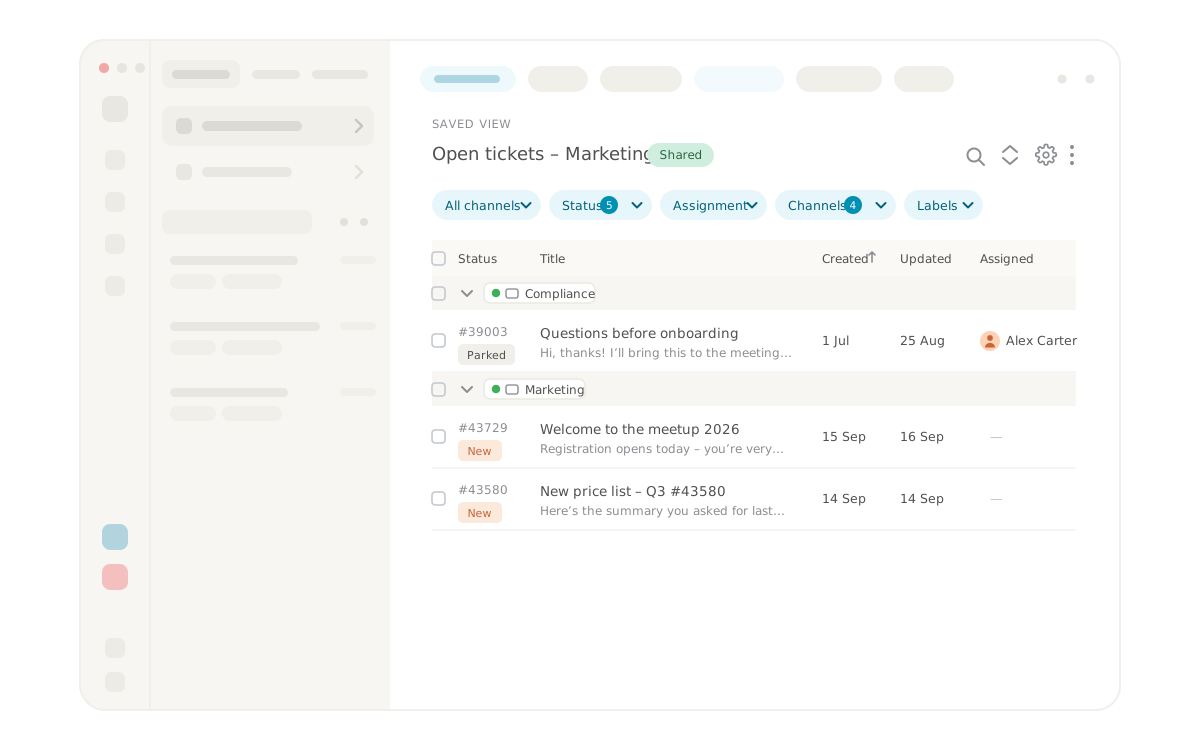


Views that show exactly the tickets you need
Workspace in Lynes contact center has a composable filter system for views. You combine the filters you need, save the result as a custom view and reach it with a single click. The view stays with you, and you can share it with colleagues who work the same queue.
That means every agent and team can shape their own way into the tickets, rather than digging through a shared list that was built for someone else.
What are views in Lynes?
Views are saved filter combinations in Lynes Workspace that show a defined set of tickets. You choose which filters apply, name the view and save it, so the same selection is ready every time you open Workspace. A view can stay private or be shared with the organization.
You decide what a view should contain and can create as many views as you like, one for each way of working. Predefined views are also available if you want to get started quickly.
How do you build a custom view?
You build a custom view by combining filters in Workspace and saving the result. Add the filters that describe the tickets you want to see, check that the list looks right, and save the view with a name that is easy to recognize. The view then appears in your view list and opens directly the next time. To get started quickly, you can begin from one of the predefined views and adapt it to your needs.
You can adjust a saved view at any time, rename it or remove it. On mobile you reach your views through a scrollable view list, so the same selection is available even when you work away from your desk.
What can you filter on?
You can combine several filters in the same view to narrow down exactly the right tickets. The available filters are:
- Status, to separate open, in progress and resolved tickets, for example
- Latest activity, to focus on what happened recently or what has been left waiting
- Channel, to see phone, email or chat only
- Assigned agent, to show your own tickets or a colleague's
Beyond the filters, you can choose whether grouping, columns and sorting are saved per view or shared, and you can switch between card view and list view depending on how you want to scan your tickets.
Can you share a view with your team?
Yes, a custom view can be shared with the organization so several people see the same selection. When you save a view, you choose whether it stays private or is shared, and a shared view becomes available to the colleagues who work the same tickets.
That makes it easy to agree on how a team follows up its work. A team lead can build a view for unanswered tickets on a specific channel and share it with the whole team, instead of each agent setting up their own version.
What do views solve in practice?
Views solve the problem that a single shared ticket list rarely suits everyone. A support agent covering chat over the weekend builds a view for open chat tickets from the last day and skips scrolling past everything else. When a colleague takes over on Monday, they open the same shared view and see immediately where the work stands.
A team lead who wants to watch the service level can instead build a view for tickets without a reply on a priority channel, group them however it suits, and leave the view in place as a standing overview. Each person gets an entry point built for their own way of working, without touching the shared structure.
Requirements for views
- Lynes contact center with access to Workspace
- A role with permission to create and, where needed, share views in the organization
Frequently asked questions about views
Can I change a view after I have saved it?
Yes. You can adjust the filters in a saved view, rename it or remove it at any time, and the changes apply the next time you open the view.
Can I have several views at the same time?
Yes, you can save several views and switch between them in your view list. Many teams keep one view per way of working, such as their own open tickets, a channel to monitor or tickets waiting for a reply.
Are my views visible to others?
Only if you choose to share them. When you save a view, you decide whether it stays private or is shared with the organization, so a shared view becomes available to colleagues who work the same tickets.
Do I have to build every view from scratch?
No. Lynes provides predefined views you can use right away, and you can create your own alongside them. Most teams use a mix, a few predefined views and a couple of custom ones that match how they work.
Frequently asked questions and answers
Here we have collected the most frequently asked questions about Lynes' features, pricing and support. Can't find the answer to your question? Do not hesitate to contact our customer service and we will be happy to help you further!
Of course! You can use several operators together with Lynes - choose the one that suits you!
We did! And we are super proud of it. We control the product from start to end.
We store it in Sweden, with all the necessary encryptions.
It works just as well on Windows, macOS, Linux, iOS & Android!
Our app works with several operators in Sweden. Choose and combine amongst our own subscriptions, Telia, Tele2, Tre and Telenor.
Inga FAQs att visa
Related Features
Lynes is packed with innovative features that will turn your client's workday into a breeze. With Lynes, you'll get the latest business phone technology from Sweden. Simply put - a carefree software that's both Lynes to use and simple to administrate.

AI telephonist
With Lynes AI telephonist, you'll never miss a call again. It responds, informs, relays or takes messages. Fully automatic, even when no one is in place!
AI telephonist
With Lynes AI telephonist, you'll never miss a call again. It responds, informs, relays or takes messages. Fully automatic, even when no one is in place!

Analytics
Lynes Analytics is a powerful built-in tool that lets you track performance in real time — from queued calls to average response times — giving you instant insights into your response groups.
Analytics
Lynes Analytics is a powerful built-in tool that lets you track performance in real time — from queued calls to average response times — giving you instant insights into your response groups.

Ticket management
Phone, email and chat automatically become tickets in Lynes contact center. Workspace has composable filters for custom views, and AI handles transcription and labels in the background.
Ticket management
Phone, email and chat automatically become tickets in Lynes contact center. Workspace has composable filters for custom views, and AI handles transcription and labels in the background.

Wallboard
Visualize your data and make it available on one or more wallboards. We let you customize each wallboard and populate it with the response groups and data you desire!
Wallboard
Visualize your data and make it available on one or more wallboards. We let you customize each wallboard and populate it with the response groups and data you desire!

Conversation Intelligence
Med Conversation Intelligence behöver du aldrig mer glömma viktiga detaljer från ett samtal. Vi spelar in, transkriberar och summerar alla era samtal så att du enkelt kan söka fram informationen!
Conversation Intelligence
Med Conversation Intelligence behöver du aldrig mer glömma viktiga detaljer från ett samtal. Vi spelar in, transkriberar och summerar alla era samtal så att du enkelt kan söka fram informationen!

Share calls
With Lynes, you can easily share a call in a chat, channel or via SMS. Once you do, the one you share the call information to can easily call up the person right from the message.
Share calls
With Lynes, you can easily share a call in a chat, channel or via SMS. Once you do, the one you share the call information to can easily call up the person right from the message.
No items found
Contact Us
Collaboration tool or a phone system? Lynes is both.
Lynes is not just a great collaboration tool for your business. Or a awesome phone system. Lynes are both. It allows you to hold video meetings, receive calls, chat with colleagues and customers and share documents - all in the same workflow.
A selection of our customers


Interested? Talk with us today.
The form only appears on the live page
The form only appears on the live page
The form only appears on the live page