.svg)
.svg)
AI Coach that suggests replies to customer tickets
AI Coach
AI Coach adds a tab to the ticket side panel in Lynes contact center where you can ask about the ticket, get suggested replies from the knowledge base and summarize it.
AI Coach in Lynes contact center reads the whole ticket, answers questions about it and suggests replies from your knowledge base in the right tone.
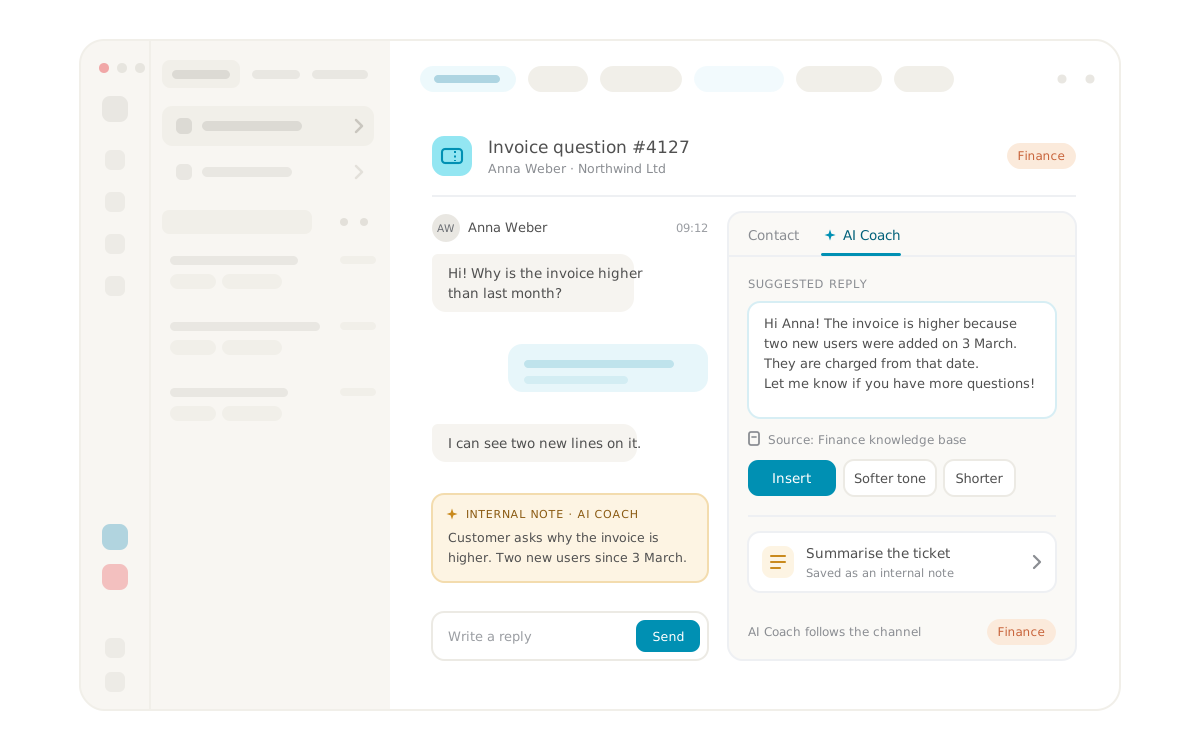


AI Coach, the colleague you bring into every ticket
AI Coach sits right inside ticket management in Lynes contact center and works alongside you while you handle a ticket. It reads through the ticket, suggests replies based on the knowledge you have given it and is there to chat with when you want to talk a solution through. It also keeps up as the conversation with the customer continues, so its help is always based on the latest that has happened in the ticket. You still decide what the customer receives, but you no longer start from an empty reply box.
Because AI Coach is activated per channel, each part of the business can also get support built around its own questions.
What is AI Coach in Lynes?
AI Coach is an assistant built into Lynes contact center that uses AI to read the customer ticket and suggest replies based on your own knowledge base. In its own tab in the ticket side panel, you can ask questions about the ticket, talk through solutions, get the ticket summarized as an internal note and choose the tone of the reply.
You can think of AI Coach as a copilot for customer service, meaning AI that suggests replies, discusses solutions and summarizes while the agent works, rather than taking over the customer conversation. The agent decides whether a suggestion is used as it is, adjusted or dropped.
How does AI Coach work?
AI Coach is built on two things you set up yourselves: instructions for how it should behave and a knowledge base with what it should know. The knowledge base belongs to the AI agent you connect to AI Coach, and every AI agent has its own.
AI Coach sits in its own tab in the ticket side panel, with quick actions for the most common tasks and a field where you can type freely. When you ask it to suggest a reply, it reads the whole ticket, whatever the channel, and recommends a reply based on the knowledge base. The suggestion can be generated in several wordings, and once you have picked the one that fits, you insert it into the reply box, adjust whatever you like and send it to the customer.
AI Coach also keeps up while the ticket is ongoing. As the conversation with the customer continues, it automatically takes in all new information in the ticket and works with it, so its suggestions always reflect where things stand right now and not how the ticket looked when you first opened it.
AI Coach is available on mobile too, so you have the same support when you handle tickets away from your desk.
What can AI Coach help with in a ticket?
AI Coach helps you in several ways in a ticket: it suggests replies, answers questions about the ticket, helps move it forward, summarizes it and gives your reply the right tone.
Suggests replies based on your knowledge base
AI Coach reads the whole ticket and suggests a reply built on what is in the knowledge base, worded according to the instructions you have set up. You avoid hunting for the right information across different documents while the customer waits, and it becomes easier to keep replies consistent when every agent works from the same knowledge.
Answers questions and talks through solutions with you
You can ask questions about the ticket directly in AI Coach and get the answers in your own language. You can also give it more context than what is in the thread, such as something you already know about the customer, and discuss different solutions before you decide how to proceed. It is a bit like talking a tricky ticket through with a colleague who has already read the whole thread.
Helps move the ticket forward
AI Coach is proactive and does not just wait for you to ask. It helps move the ticket forward, and because it follows the conversation with the customer, it always knows where the ticket stands.
Summarizes the ticket as an internal note
When you ask for it, AI Coach summarizes the ticket, and you can then publish the summary on the ticket as an internal note. The note is only visible to agents, not to the customer, so a colleague who takes over or jumps into a long ticket can understand the situation without reading the entire thread.
Gives the reply the right tone and length
Suggested replies come in several wordings, such as professional, friendly or shorter, so you can pick the one that suits the customer before you insert the reply. If you have already written a reply yourself, AI Coach can rewrite it in a different tone or make it longer or shorter.
Can you use a different AI Coach in each channel?
Yes. AI Coach is activated per channel, and for each channel you choose which AI agent to connect to AI Coach. That way agents get support that fits the tickets coming in on that particular channel.
If you work in both support and finance, for example, you work with a different AI Coach depending on which channel you are answering the ticket in. In the support channel, suggestions are based on what you have gathered about the product and common troubleshooting, and in the finance channel on what you have gathered about invoices and payments. AI Coach follows the channel, so you get the right support without having to think about it.
What does AI Coach solve in practice?
AI Coach solves the problem that agents often spend more time searching and reading than actually helping the customer. Picture an agent who splits the day between support and finance. A ticket arrives in the finance channel where the customer wonders why an invoice looks different from last month, and the thread has already gone back and forth a few times.
The agent asks AI Coach to summarize the ticket and publishes the summary as an internal note. The agent also knows something that is not in the thread, namely that the customer recently switched to a new contract, and tells AI Coach in the chat. Together they go through two possible explanations for the invoice, and the agent then asks for a suggested reply based on the finance team's knowledge base and the new context. The agent inserts the suggestion, asks AI Coach to soften the tone a little and sends it.
When the customer replies with another question, AI Coach takes in the reply automatically, so the next suggestion is based on what the customer just wrote. The next ticket in the queue is a support question, and this time it is the support channel's AI Coach that helps out, backed by an entirely different knowledge base. When a colleague takes over the finance ticket the following day, reading the internal note is enough to know where things stand.
Requirements for AI Coach
- Lynes contact center with agents who handle tickets
- AI Coach activated for the organization
- At least one AI agent with instructions and a knowledge base
- AI Coach connected to the channels where it should be used
Frequently asked questions about AI Coach
Does AI Coach send replies directly to the customer?
No. AI Coach suggests and you decide. Nothing is sent on the agent's behalf, and a suggestion only ends up in the reply box when you choose to insert it. You can change as much as you like before it goes out, and that also applies when AI Coach takes the initiative itself.
What is the difference between AI Coach and an AI agent?
An AI agent in Lynes can work on its own, for example by answering customers by phone or chat. AI Coach instead works alongside an agent in the ticket and uses the knowledge base of the AI agent you have connected to the channel. The difference lies in who is in contact with the customer, and with AI Coach it is always a person.
Can the customer see the summary?
No. When AI Coach summarizes a ticket, the summary is saved as an internal note, and internal notes are only visible to agents. That makes the summary useful for handovers and for colleagues joining a long ticket, without any of it reaching the customer.
Where does AI Coach get its answers from?
AI Coach works from the knowledge base belonging to the AI agent you have connected to the channel and from the whole ticket with its full history, including new information that comes in while the conversation with the customer is ongoing. If you have given AI Coach more context in the chat, it takes that into account too. How replies are worded is governed by the instructions you have set up.
Frequently asked questions and answers
Here we have collected the most frequently asked questions about Lynes' features, pricing and support. Can't find the answer to your question? Do not hesitate to contact our customer service and we will be happy to help you further!
Of course! You can use several operators together with Lynes - choose the one that suits you!
We did! And we are super proud of it. We control the product from start to end.
We store it in Sweden, with all the necessary encryptions.
It works just as well on Windows, macOS, Linux, iOS & Android!
Our app works with several operators in Sweden. Choose and combine amongst our own subscriptions, Telia, Tele2, Tre and Telenor.
Inga FAQs att visa
Related Features
Lynes is packed with innovative features that will turn your client's workday into a breeze. With Lynes, you'll get the latest business phone technology from Sweden. Simply put - a carefree software that's both Lynes to use and simple to administrate.

Share calls
With Lynes, you can easily share a call in a chat, channel or via SMS. Once you do, the one you share the call information to can easily call up the person right from the message.
Share calls
With Lynes, you can easily share a call in a chat, channel or via SMS. Once you do, the one you share the call information to can easily call up the person right from the message.

AI telephonist
With Lynes AI telephonist, you'll never miss a call again. It responds, informs, relays or takes messages. Fully automatic, even when no one is in place!
AI telephonist
With Lynes AI telephonist, you'll never miss a call again. It responds, informs, relays or takes messages. Fully automatic, even when no one is in place!

Auto Labels
Auto labels automatically mark important calls, send alerts and give you instant visibility. Also works for personal numbers and manual tagging.
Auto Labels
Auto labels automatically mark important calls, send alerts and give you instant visibility. Also works for personal numbers and manual tagging.

Ticket management
Phone, email and chat automatically become tickets in Lynes contact center. Workspace has composable filters for custom views, and AI handles transcription and labels in the background.
Ticket management
Phone, email and chat automatically become tickets in Lynes contact center. Workspace has composable filters for custom views, and AI handles transcription and labels in the background.

Conversation Intelligence
Med Conversation Intelligence behöver du aldrig mer glömma viktiga detaljer från ett samtal. Vi spelar in, transkriberar och summerar alla era samtal så att du enkelt kan söka fram informationen!
Conversation Intelligence
Med Conversation Intelligence behöver du aldrig mer glömma viktiga detaljer från ett samtal. Vi spelar in, transkriberar och summerar alla era samtal så att du enkelt kan söka fram informationen!

Analytics
Lynes Analytics is a powerful built-in tool that lets you track performance in real time — from queued calls to average response times — giving you instant insights into your response groups.
Analytics
Lynes Analytics is a powerful built-in tool that lets you track performance in real time — from queued calls to average response times — giving you instant insights into your response groups.

.avif)
Knowledge base
With Lynes knowledge bases, you control what your AI agents use—FAQs, docs, and URLs in one trusted, updated source. AI-ready now!
Knowledge base
.svg)
Ticket management
Phone, email and chat automatically become tickets in Lynes contact center. Workspace has composable filters for custom views, and AI handles transcription and labels in the background.
Ticket management

.svg)
Rephrase text
Sloppy, stressed or lazy? There are various reasons for needing help with better writing messages. With the help of AI, you get, among other things, the ability to rephrase, expand or make the text more formal.
Rephrase text
Contact Us
Collaboration tool or a phone system? Lynes is both.
Lynes is not just a great collaboration tool for your business. Or a awesome phone system. Lynes are both. It allows you to hold video meetings, receive calls, chat with colleagues and customers and share documents - all in the same workflow.
A selection of our customers


Interested? Talk with us today.
The form only appears on the live page
The form only appears on the live page
The form only appears on the live page